Medical AI Assistant
AI Phone Assistant
AI Phone Assistant
Relieves your phone – answers calls, schedules appointments, and automatically documents
The AI phone assistant answers incoming calls, records the caller's name, phone number, and reason for the call, schedules appointments, and enters them directly into your calendar. Existing appointments can also be rescheduled after patient identification.
Noticeably relieve the workload of medical assistants/reception – more time for important practice tasks
Automatically book or reschedule appointments – no waiting on hold
Concerns are immediately structured and captured – instead of using paper notes

The Problem
High telephone workload at reception
The phone rings constantly – while patients are sitting in front of you. Appointment requests are particularly time-consuming: finding available slots, keeping duration in mind, asking follow-up questions, rescheduling appointments. As a result, there is less time for other tasks at the reception, leading to missed calls, callback lists, and frustration among patients.
Other tasks are left undone, resulting in missed calls, callback lists, and dissatisfaction.
Appointment scheduling is particularly time-consuming due to slot searching, follow-up queries, and rescheduling.
Other tasks are left undone, resulting in missed calls, callback lists, and patient dissatisfaction.
The Solution
AI Phone Assistant
AI Phone Assistant
ClinicOS handles the reception and qualification of calls and can directly manage appointments: The AI phone assistant conducts a brief, clear conversation, understands the concern, schedules new appointments, reschedules existing ones upon identification, and documents everything in a structured manner for your team. This significantly relieves medical assistants, allowing them to focus on other important tasks.

Features
What the AI phone assistant specifically does for you

Appointment Rescheduling
After identifying the patient, existing appointments can be found and rescheduled.
Appointment scheduling
select appropriate appointment type, consider duration, offer available time slots
Call Reception
During high volumes or outside of your phone hours
Calendar Entry
Appointment will be automatically added to the calendar
Understanding of the concern
(e.g., appointment request, rescheduling, call back, prescription, findings)
Structured Conversation Summary
for your team (including results)
Collection of contact information
(Name, Phone Number)
Callback option
If necessary, initiate a callback and prioritize the matter
Appointment Rescheduling
After identifying the patient, existing appointments can be found and rescheduled.
Appointment Rescheduling
After identifying the patient, existing appointments can be found and rescheduled.
Appointment scheduling
select appropriate appointment type, consider duration, offer available time slots
Appointment scheduling
select appropriate appointment type, consider duration, offer available time slots
Call Reception
During high volumes or outside of your phone hours
Call Reception
During high volumes or outside of your phone hours
Calendar Entry
Appointment will be automatically added to the calendar
Calendar Entry
Appointment will be automatically added to the calendar
Understanding of the concern
(e.g., appointment request, rescheduling, call back, prescription, findings)
Structured Conversation Summary
for your team (including results)
Structured Conversation Summary
for your team (including results)
Collection of contact information
(Name, Phone Number)
Collection of contact information
(Name, Phone Number)
Callback option
If necessary, initiate a callback and prioritize the matter
Callback option
If necessary, initiate a callback and prioritize the matter
The Result & How It Works
More tranquility at the reception – allowing your team to gain time for more important tasks
Patients receive immediate assistance, appointments are automatically booked or rescheduled, and medical assistants have less phone work and coordination to handle. This leaves more capacity for tasks that truly require human attention.
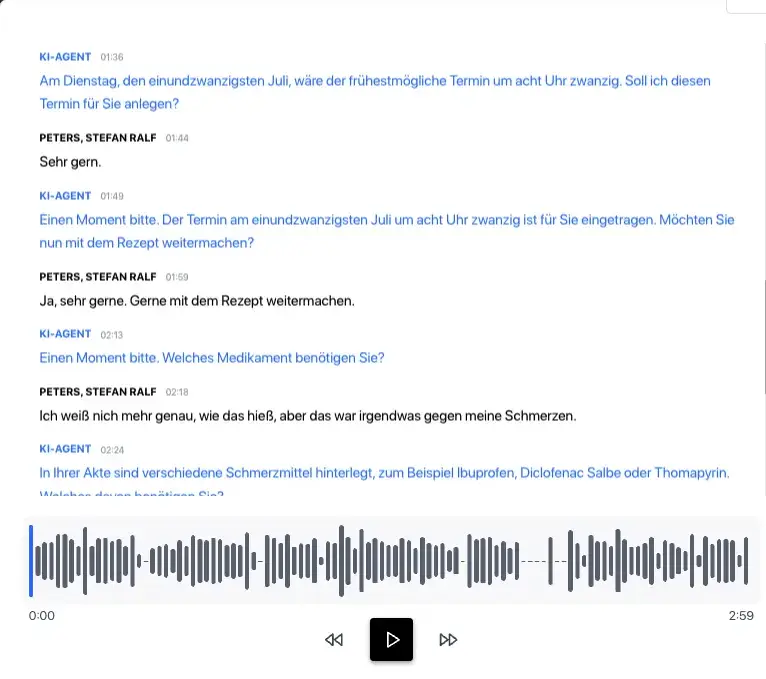
Below, we show how it works in everyday practice in three steps:
Step 1 - Greeting & Identification
The assistant answers the call and records/checks the key information.
Step 2 - Apply Appointment Logic
Step 3 - Book or Reschedule

The Result & How It Works
More tranquility at the reception – allowing your team to gain time for more important tasks
Patients receive immediate assistance, appointments are automatically booked or rescheduled, and medical assistants have less phone work and coordination to handle. This leaves more capacity for tasks that truly require human attention.
Below, we show how it works in everyday practice in three steps:

Step 1 - Greeting & Identification
The assistant answers the call and records/checks the key information.
Step 2 - Apply Appointment Logic
Step 3 - Book or Reschedule
The Result & How It Works
More tranquility at the reception – allowing your team to gain time for more important tasks
Patients receive immediate assistance, appointments are automatically booked or rescheduled, and medical assistants have less phone work and coordination to handle. This leaves more capacity for tasks that truly require human attention.
Below, we show how it works in everyday practice in three steps:

Step 1 - Greeting & Identification
The assistant answers the call and records/checks the key information.
Step 2 - Apply Appointment Logic
Step 3 - Book or Reschedule

For Private Practices
Why this is especially relevant for private practices
Noticeable relief for medical assistants/reception during high call volumes
More focus on on-site patients and internal practice processes
Better accessibility and faster service for patients
Fewer errors through automated, structured appointment processes
FAQ
Find answers to frequently asked questions about the features, security, and usage of ClinicOS.
Can I set when the assistant is active?
Can the assistant consider different types of appointments?
How can the assistant reschedule appointments without causing any confusion?
FAQ
Find answers to frequently asked questions about the features, security, and usage of ClinicOS.