PRACTICE MANAGEMENT

Billing

Billing

Billing for Private Practices – GOÄ, GebüH, UV-GOÄ, and VAT Services in One System

Billing for Private Practices – GOÄ, GebüH, UV-GOÄ, and VAT Services in One System

ClinicOS supports you in billing private patients and self-payers – including GOÄ, GebüH, UV-GOÄ, and taxable services. Through a bidirectional interface, data can be synchronized with accounting systems like DATEV or BuchhaltungsButler.

ClinicOS supports you in billing private patients and self-payers – including GOÄ, GebüH, UV-GOÄ, and taxable services. Through a bidirectional interface, data can be synchronized with accounting systems like DATEV or BuchhaltungsButler.

All relevant billing types in one workflow

Reduced manual effort through accounting synchronization

Clear, transparent processes for practice and accounting

The Problem

Billing with Media Disruptions in Everyday Practice

Billing with Media Disruptions in Everyday Practice

Billing often involves a disconnect between systems: different regulations, manual invoicing processes, separate exports for accounting, and inquiries when documents or bookings are missing. The workload and risk of errors increase significantly, especially with mixed services (e.g., GOÄ + VAT).

Billing often involves a disconnect between systems: different regulations, manual invoicing processes, separate exports for accounting, and inquiries when documents or bookings are missing. The workload and risk of errors increase significantly, especially with mixed services (e.g., GOÄ + VAT).

Billing often involves a disconnect between systems: different regulations, manual invoicing processes, separate exports for accounting, and inquiries when documents or bookings are missing. The workload and risk of errors increase significantly, especially with mixed services (e.g., GOÄ + VAT).

Complex regulations due to varying billing logics

Complex regulations due to varying billing logics


Manual processes in invoicing and accounting export

Manual processes in invoicing and accounting export


High effort and risk of errors in mixed services

High effort and risk of errors in mixed services


The Solution

Billing

Billing

ClinicOS consolidates billing into one system: You can create invoices according to the appropriate framework and then synchronize the data bidirectionally with your accounting – for less manual work and smoother processes.
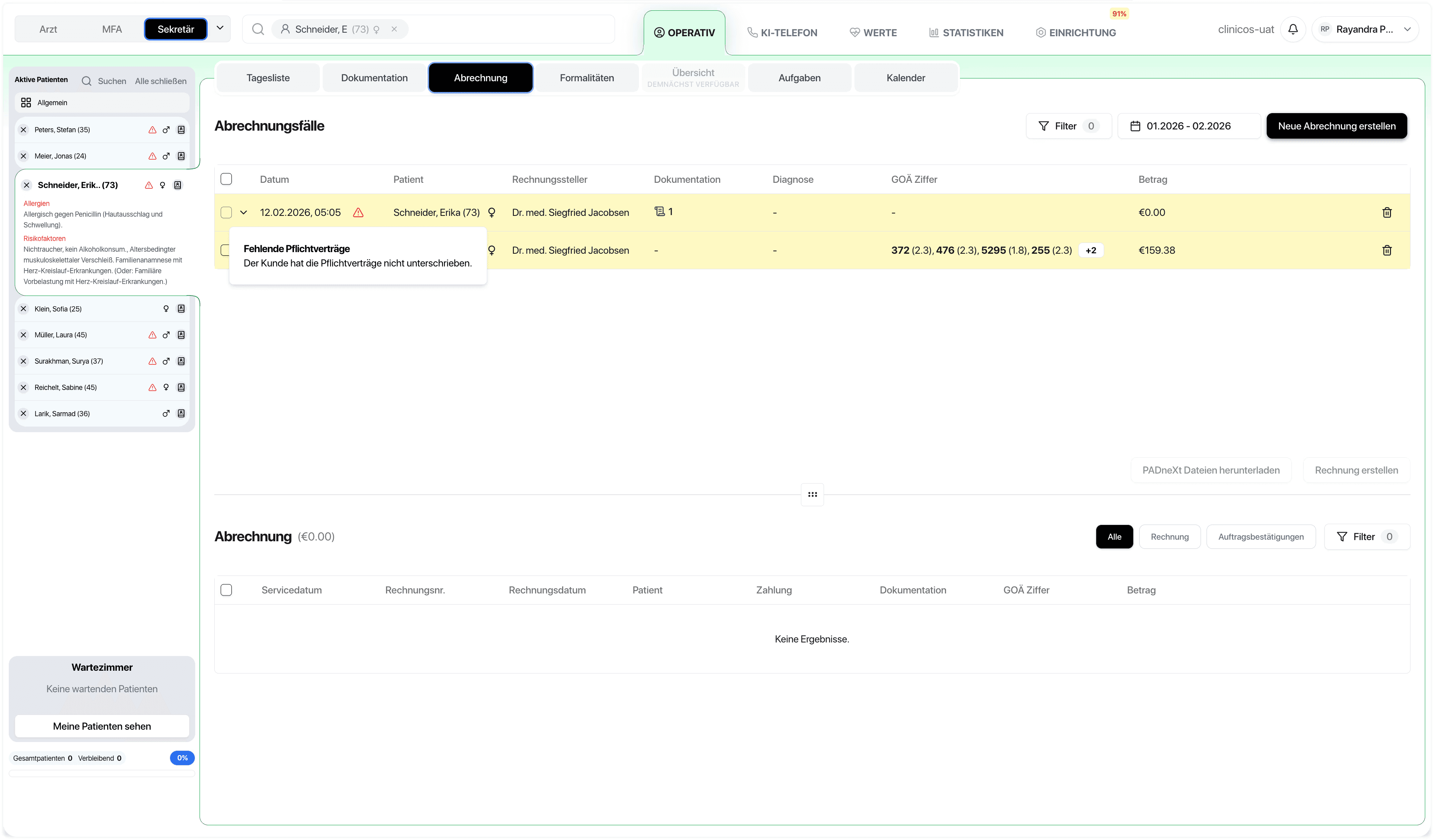
ClinicOS consolidates billing into one system: You can create invoices according to the appropriate framework and then synchronize the data bidirectionally with your accounting – for less manual work and smoother processes.

Features

What ClinicOS specifically handles for you in billing
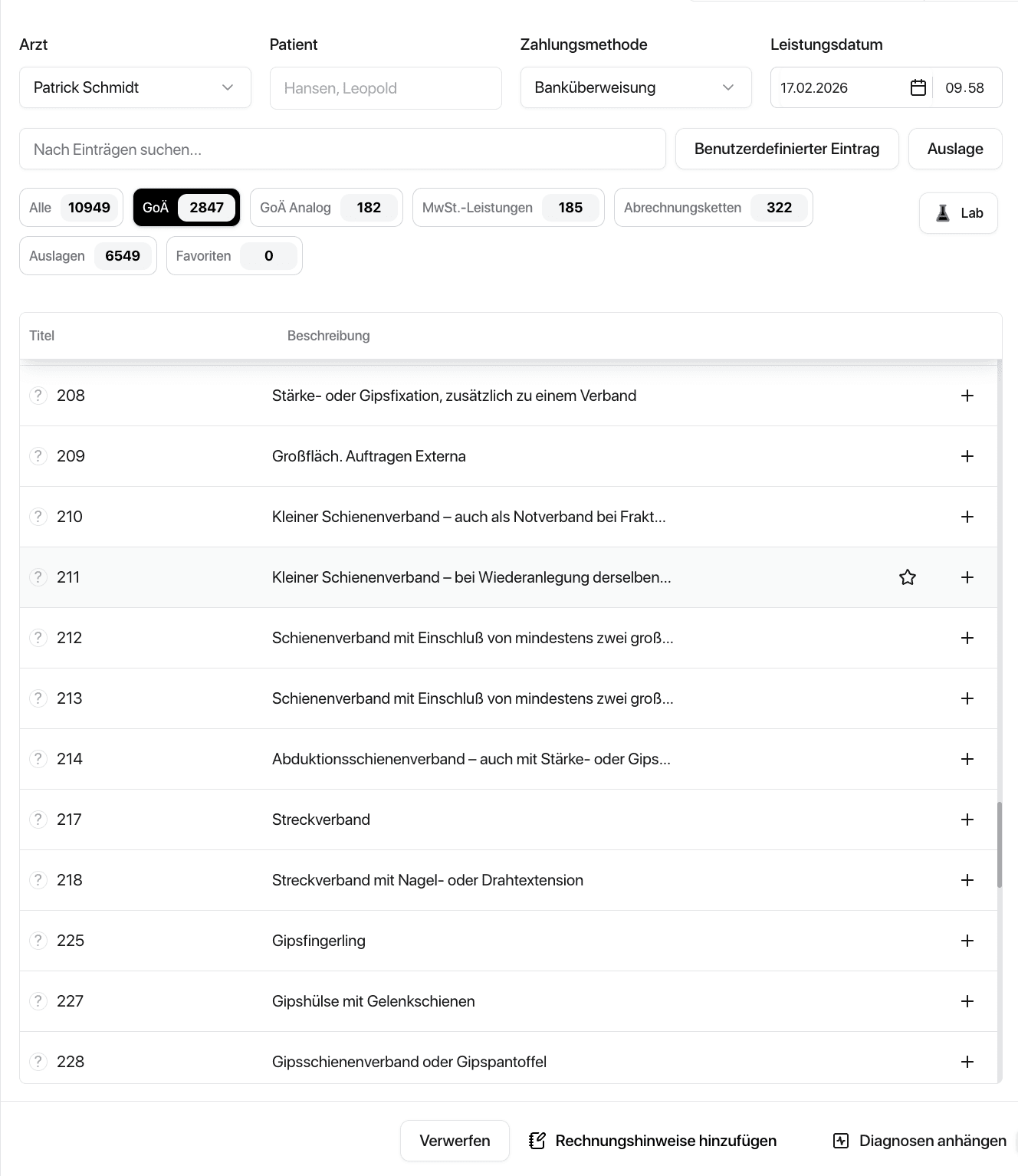
What ClinicOS specifically handles for you in billing
Bidirectional interface for accounting

Synchronization with systems like DATEV and BuchhaltungsButler

Less Duplication of Care

Billing and accounting data remain consistent

Less Duplication of Care

Billing and accounting data remain consistent

Taxable Services (VAT)

accurately represent

Taxable Services (VAT)

accurately represent

Create and manage invoices centrally

in the practice workflow

Create and manage invoices centrally

in the practice workflow

GOÄ Billing

for private patients and self-pay patients

GebüH Billing

(depending on the area of service)

UV-GOÄ billing

for appropriate cases

The Result & How It Works

Less billing chaos – and smoother accounting

They cover all relevant types of billing, reduce manual exports, and prevent duplicate entries. This saves time for the team and ensures clearer processes toward the tax advisor/accounting.

Below, we show how it works in everyday practice in three steps:

Step 1 - Choose billing type

GOÄ, GebüH, UV-GOÄ or VAT service depending on the case.

Step 2 - Create Invoice
Step 3 - Synchronize Accounting
Ein Bild der Budget-Benutzeroberfläche von Freelio

The Result & How It Works

Less billing chaos – and smoother accounting

They cover all relevant types of billing, reduce manual exports, and prevent duplicate entries. This saves time for the team and ensures clearer processes toward the tax advisor/accounting.

Below, we show how it works in everyday practice in three steps:

Ein Bild der Budget-Benutzeroberfläche von Freelio
Step 1 - Choose billing type

GOÄ, GebüH, UV-GOÄ or VAT service depending on the case.

Step 2 - Create Invoice
Step 3 - Synchronize Accounting

The Result & How It Works

Less billing chaos – and smoother accounting

They cover all relevant types of billing, reduce manual exports, and prevent duplicate entries. This saves time for the team and ensures clearer processes toward the tax advisor/accounting.

Below, we show how it works in everyday practice in three steps:

Ein Bild der Budget-Benutzeroberfläche von Freelio
Step 1 - Choose billing type

GOÄ, GebüH, UV-GOÄ or VAT service depending on the case.

Step 2 - Create Invoice
Step 3 - Synchronize Accounting

For Private Practices

Why this is especially relevant for private practices

Why this is especially relevant for private practices

Why this is especially relevant for private practices

A system for diverse regulations instead of isolated solutions

Less coordination with accounting through consistent data

Professional Processes for a Scalable Private Practice

FAQ

Find answers to frequently asked questions about the features, security, and usage of ClinicOS.

Which accounting systems can ClinicOS communicate with?
What does "bidirectional" mean in the context of the accounting interface?
Can I use multiple billing methods in a practice?

FAQ

Find answers to frequently asked questions about the features, security, and usage of ClinicOS.

Which accounting systems can ClinicOS communicate with?
What does "bidirectional" mean in the context of the accounting interface?
Can I use multiple billing methods in a practice?